
I’m an affiliate content writer who specializes in creating research-based, easy-to-understand guides that help readers make confident buying decisions. I cover a wide range of topics including tech, lifestyle, e-commerce products, and online services. My approach is simple — clear explanations, honest insights, and practical recommendations for real-world use. I focus on delivering helpful and trustworthy content that genuinely benefits readers, whether they’re choosing the right product, comparing services, or searching for solutions online.
Subscribe
A Simple Guide to Shared, VPS & Cloud Hosting (For Total Beginners)
Understand hosting types in the simplest way — with clear examples for absolute beginners.
⭐ Introduction
If you're new to building websites, one of the first terms you’ll encounter is hosting. But when you start researching, you’ll quickly get confused:
What is Shared Hosting?
What is VPS Hosting?
What is Cloud Hosting?
Which one should beginners choose?
Don’t worry — this guide is written specifically for beginners, using simple language, real examples, and practical comparisons so you can choose the right hosting type for your blog, business, or online project.
Let’s break things down in the easiest way possible.
⭐ What Is Web Hosting (Simple Explanation)
Your website’s files (text, images, code, videos) all need a place to live.
Hosting = the “home” where these files stay.
Think of it like:
Hosting = your website’s house
Domain name = your address
There are 3 main types of hosting used by beginners:
✔ Shared Hosting
✔ VPS Hosting
✔ Cloud Hosting
Each one has different power, speed, and price.
Let’s break them down with examples.
⭐ 1. What Is Shared Hosting? (Simplest Hosting Type)
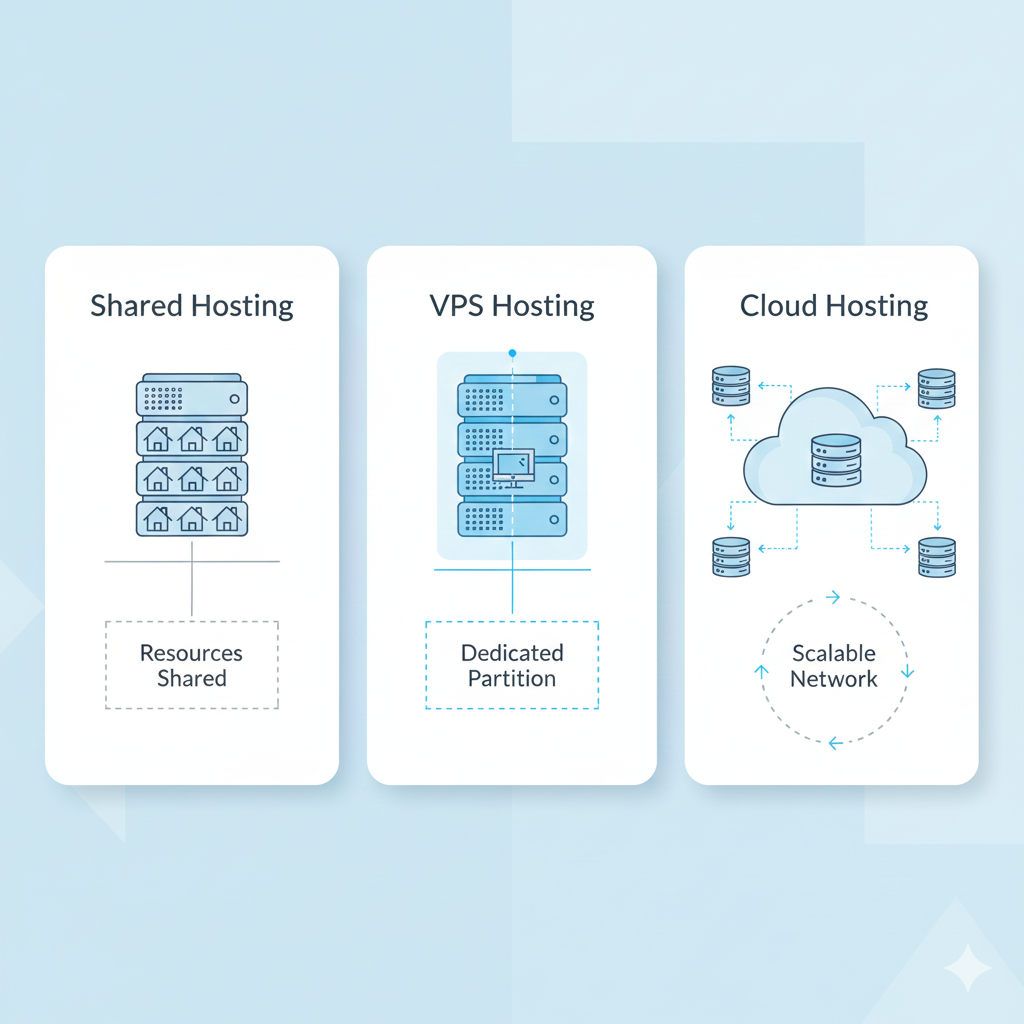
Shared Hosting means your website lives on a server that is shared with many other websites — like renting a room in a shared apartment.
Best For:
Beginners
Small blogs
Personal websites
Low traffic sites
Students
How It Works:
You share server CPU, RAM, bandwidth with others.
This keeps it cheap but slightly slower.
Benefits:
✔ Cheapest hosting
✔ Perfect for beginners
✔ Easy setup
✔ Works for all basic websites
Limitations:
✘ Not ideal for high traffic
✘ Slower during peak times
✘ Less control over performance
🔹 Recommended Shared Hosting Providers
Hostinger Shared Hosting → Fastest shared hosting for beginners
Link: https://www.hostinger.comBluehost Shared Hosting → Easiest WordPress setup
Link: https://www.bluehost.com
⭐ 2. What Is VPS Hosting? (More Power & Control)
VPS = Virtual Private Server
This means you get your own “private space” inside a bigger server.
Think of VPS like renting your own apartment, not sharing a room.
Best For:
Medium-sized websites
Growing blogs
Online stores
Websites needing more speed
How VPS Hosting Works:
The server is divided into virtual sections.
Each user gets their own CPU, RAM, storage — dedicated to them.
Benefits:
✔ Much faster
✔ More stable
✔ Handles more traffic
✔ More security
✔ More control
Limitations:
✘ More expensive
✘ Slightly more technical
🔹 Recommended VPS Providers
Hostinger VPS → affordable + powerful
https://www.hostinger.comBluehost VPS → great for scaling WordPress
https://www.bluehost.com
⭐ 3. What Is Cloud Hosting? (Fastest & Most Reliable)
Cloud hosting doesn’t use a single server — it uses multiple connected servers that work together.
Imagine if your website had many houses instead of one.
If one fails, another instantly takes over.
Best For:
Websites needing highest uptime
High traffic sites
Online stores
Businesses who cannot afford downtime
Benefits:
✔ Extremely fast
✔ Handles heavy traffic
✔ Very reliable
✔ Auto-scaling
✔ Great for performance
Limitations:
✘ Higher price
✘ Slightly more complex
🔹 Recommended Cloud Hosting Providers
Hostinger Cloud Hosting → best entry-level cloud hosting
https://www.hostinger.comBluehost Cloud (indirect AWS solutions) → business-level solutions
https://www.bluehost.com

⭐ Shared vs VPS vs Cloud Hosting: Simple Comparison Table
| Feature | Shared Hosting | VPS Hosting | Cloud Hosting |
|---|---|---|---|
| Price | Lowest | Mid-range | Higher |
| Speed | Basic | Fast | Very Fast |
| Security | Basic | Strong | Very Strong |
| Traffic Capacity | Low | Medium | Very High |
| Control | Low | Medium | High |
| Best For | Beginners | Growing sites | Businesses & eCommerce |
⭐ Which Hosting Should Beginners Choose?
✔ Choose Shared Hosting if:
You’re launching your first website
You want the lowest price
You have small traffic
You want simple setup
Perfect for:
Blogs • Portfolio • Small business sites
✔ Choose VPS Hosting if:
Your website is growing
You want more speed
You expect more visitors
You need better performance
Perfect for:
Growing blogs • Medium traffic • Small eCommerce
✔ Choose Cloud Hosting if:
You need maximum uptime
Your traffic fluctuates
You run a shop or business
You want auto-scaling performance
Perfect for:
Businesses • High-traffic blogs • Stores
⭐ Final Recommendation
For most beginners,
👉 Shared Hosting is the best and most affordable choice.
If your website grows:
👉 Upgrade to VPS Hosting
If your website becomes a business:
👉 Move to Cloud Hosting
You can start small and grow anytime.
🔹 Recommended Providers:
Hostinger: Fastest + cheapest shared hosting
https://www.hostinger.comBluehost: Best for WordPress beginners
https://www.bluehost.com
Both providers let you start small and upgrade later without losing data — perfect for beginners.
- shared hosting vs vps
- cloud hosting explained
- types of web hosting
- beginner hosting guide
- vps vs cloud hosting
WRITTEN BY
Khorshed AlomI’m an affiliate content writer who specializes in creating research-based, easy-to-understand guides that help readers make confident buying decisions. I cover a wide range of topics including tech, lifestyle, e-commerce products, and online services. My approach is simple — clear explanations, honest insights, and practical recommendations for real-world use. I focus on delivering helpful and trustworthy content that genuinely benefits readers, whether they’re choosing the right product, comparing services, or searching for solutions online.