Innovation & Tech
From Flat to Fantastic: Reimagine Vector Art with Generative Recolor in Firefly
In vector design, color isn’t just decoration—it’s communication. Whether subtle or bold, your palette shapes how viewers feel, interpret, and engage with your artwork. With Adobe Firefly’s generative capabilities, exploring color isn’t just easier—it’s smarter, allowing you to craft palettes that align with mood, message, and intent from the very beginning.
Some of our links may be affiliate links and if you buy through our link, we might generate some commissions.
- Color Sets the Emotional Tone
- Drive Meaning Through Hue and Contrast
- Enhance Visual Harmony and Impact
- Fuel Creativity with Firefly’s Generative Tools
Adobe Firefly allows you to experiment with color dynamically—suggesting palette variations, applying generative fills, and even transforming vector elements with descriptive prompts. This AI-assisted process helps spark ideas and fine-tune visuals faster, making color exploration a more creative and intuitive step in your workflow.
Ultimately, color isn’t a finishing touch—it’s a foundational element in vector design.
Discover Adobe's suite of products.
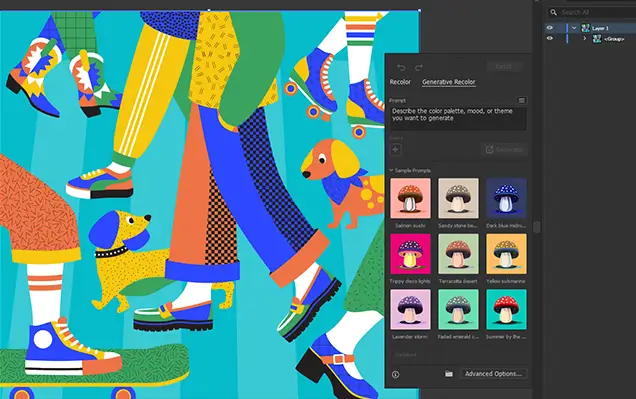
Enter Generative Recolor: Smarter Color Exploration with AI
Choosing the perfect color palette is a key step in any design process—but it can also be one of the most time-consuming. Adobe Firefly’s Generative Recolor tool changes that by using AI to quickly generate diverse, visually compelling color schemes tailored to your vector artwork. Whether you're designing for brand consistency or creative experimentation, Generative Recolor offers a smarter, faster way to explore color.
- Effortless Color Variations in Seconds
With Generative Recolor, you simply describe the look you want—like “sunset tones,” “vintage pastels,” or “tech-inspired neon”—and Firefly instantly applies a new, AI-curated palette to your vector design. It goes beyond basic presets by understanding mood, context, and composition, allowing for deeper creative alignment.
- Design-Driven AI Intelligence
- Unlock Rapid Iteration and Inspiration
- Seamless Vector Integration
Designed for vector-based artwork, Generative Recolor integrates directly with your design process. Once you generate a palette, you can still edit individual elements in Illustrator or other Creative Cloud apps, giving you full control and flexibility to refine the final outcome.
Discover Adobe's suite of products.
Instant Inspiration: Generate Multiple Color Variations in a Click
Color exploration can be one of the most creatively rewarding—and time-consuming—parts of the design process. Adobe Firefly’s Generative Recolor streamlines that step, letting you generate multiple color variations for your vector artwork instantly. No more manually swapping swatches or tweaking palettes one shade at a time—just describe your vision, and let AI bring it to life.
- Explore Diverse Palettes Instantly
With just a prompt like “autumn-inspired tones” or “modern minimal neutrals,” Firefly can generate a range of color schemes tailored to your design. It considers your artwork’s structure and balance, applying colors thoughtfully across elements to preserve harmony and readability.
- Visualize Options Without Guesswork
Each click yields multiple variations—so you can compare looks side by side, evaluate how different palettes shift the tone or mood, and choose what fits best. Whether you’re designing for different audiences or platforms, these instant previews help you make creative decisions faster and more confidently.
- Skip the Manual Edits
Traditionally, testing a new color theme meant selecting and changing each element by hand. With Generative Recolor, Firefly handles the heavy lifting—freeing you to focus on the design, not the mechanics.
- Great for Branding, Campaigns, and Theming
Quickly adapt one illustration for seasonal campaigns, client branding guidelines, or alternate product lines—without rebuilding your artwork. Firefly helps ensure visual consistency while allowing creative variation across outputs.
Discover Adobe's suite of products.
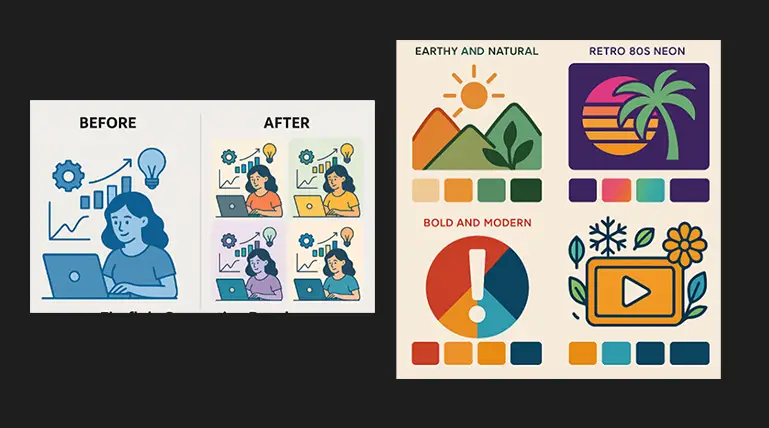
Customize the Mood: Choose Themes, Styles, and Vibes
Color is one of the most powerful tools for setting the tone of your design—and Adobe Firefly’s Generative Recolor makes it easier than ever to match your artwork to a specific mood or aesthetic. With AI-driven prompts, you can generate color palettes that reflect distinct styles, emotions, or design themes, transforming the feel of your vector work in just seconds.
- Guide Your Palette with Descriptive Prompts
Firefly responds to natural language inputs, so you can direct the color outcome with simple, intuitive prompts. Try themes like “bold and modern,” “soft pastels,” “earthy and natural,” or “retro 80s neon.” The AI understands mood-based language and applies palettes that align with your creative vision.
- Align Color with Creative Intent
- Style-Driven Color at Scale
Whether you're producing a suite of deliverables or exploring multiple design directions, Generative Recolor helps you scale style effortlessly. Generate and apply custom themes across entire vector sets with consistent, professional results—without repetitive manual editing.
- Perfect for Branding and Concept Development
Mood-based recoloring is especially useful during early design phases. It allows you to explore and present multiple color directions that evoke different emotions, making it easier to gain stakeholder feedback and define the right visual identity.
Discover Adobe's suite of products.
Perfect for Projects: Apply Recoloring Across Branding, Posters, and More
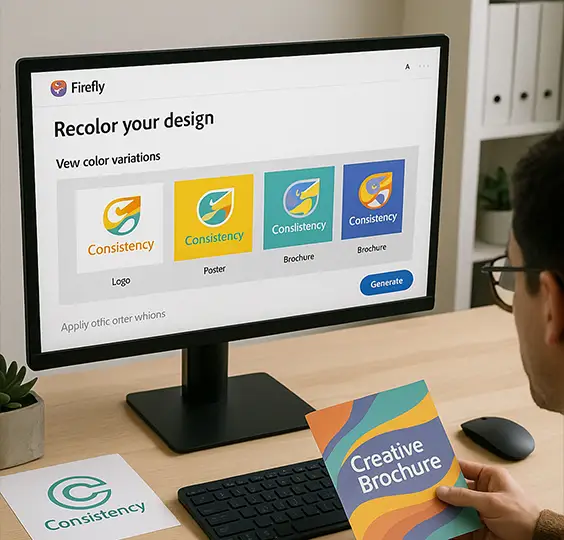
Adobe Firefly’s Generative Recolor isn’t just a time-saver—it’s a versatile creative tool that adapts to nearly any design scenario. Whether you're updating client branding, creating themed poster series, or experimenting with personal artwork, rapid recoloring gives you the flexibility to move fast while staying visually consistent and on-brand.
- Branding Across Markets and Mediums
Need to present a logo or illustration in multiple brand color variations? Generative Recolor helps you instantly adapt vector artwork for different product lines, sub-brands, or seasonal campaigns—without rebuilding designs from scratch. It's a game-changer for brand designers juggling color systems and cross-platform assets.
- Themed Poster and Print Design
When designing a series—like event posters, album covers, or editorial illustrations—cohesion is key. Firefly allows you to quickly apply unique but related palettes across each version, maintaining thematic unity while avoiding visual repetition.
- Effortless Client Revisions
- Creative Exploration and Portfolio Development
- Product Design and Merch Applications
Quickly adapt vector assets for mockups or product variations—think t-shirts, packaging, or stickers—by applying color schemes tailored to different audiences or contexts.
Discover Adobe's suite of products.
Refine and Repeat: Tweak, Save, and Regenerate with Ease
Creative work often involves iteration—and with Adobe Firefly’s Generative Recolor, that process becomes fast, fluid, and creatively empowering. Whether you’re searching for the perfect palette or fine-tuning a mood, Firefly makes it easy to regenerate variations, make targeted refinements, and save your best results for future use.
- Regenerate with a Click
- Tweak to Match Your Vision
- Prompt Updates for New Moods
- Save and Reuse Winning Palettes
- Iterate Without the Guesswork
With AI doing the heavy lifting, you can spend more time making creative choices and less time adjusting color values manually. The result is a faster, more inspired color exploration process—one where iteration is part of the creative momentum, not a roadblock
Discover Adobe's suite of products.
Work Smarter, Stay Inspired: Save Time Without Sacrificing Style
Creativity thrives on momentum—and Adobe Firefly’s Generative Recolor is designed to keep that momentum going. By removing the repetitive, time-consuming aspects of palette creation, this AI-powered tool helps you stay in flow, delivering high-quality results without slowing down your process or compromising your vision.
- Instant Results, Creative Freedom
- Professional Polish, AI Efficiency
- Stay Inspired with Fresh Possibilities
- Optimize Time Across Projects
- Flexible for Refinement and Finalization
Once you find a direction that works, you can export, fine-tune in Illustrator, or save your color scheme for reuse—ensuring your work stays adaptable and production-ready.
Discover Adobe's suite of products.
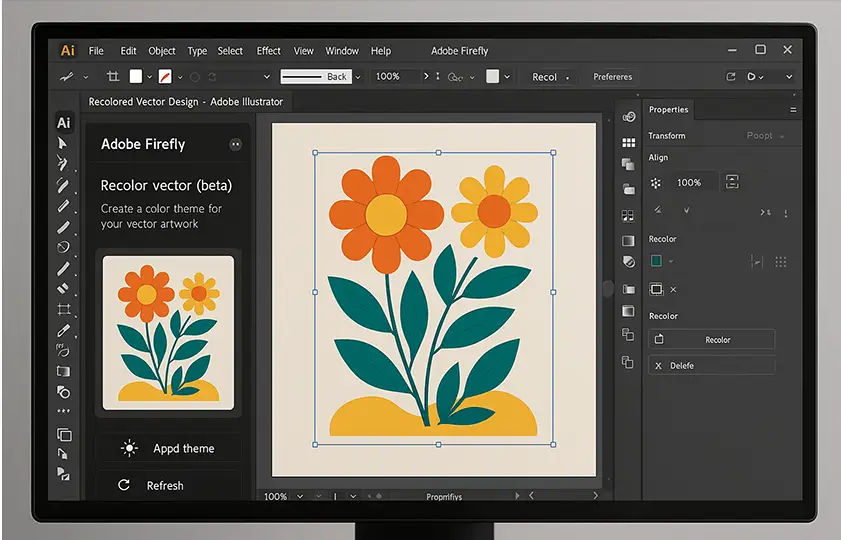
Creative Cloud Ready: Seamless Workflow from Firefly to Illustrator
Once you’ve transformed your vector artwork using Generative Recolor in Adobe Firefly, the next step is just as smooth. Firefly is fully integrated with Adobe Creative Cloud, allowing you to export your recolored designs directly into Adobe Illustrator—where you can fine-tune, finalize, and deliver with professional precision.
- Export with a Click
After generating your preferred color variation, simply export the artwork as a vector-compatible file. Firefly maintains all path integrity and color groupings, ensuring your design arrives in Illustrator exactly as intended—ready for detailed edits or immediate layout integration.
- Edit with Full Illustrator Control
- Maintain Workflow Consistency
- Library Integration for Design Reuse
Save your final artwork or color themes to Creative Cloud Libraries to keep assets accessible across projects and Adobe apps. This supports consistent branding and faster turnaround for future designs.
Generative Recolor is more than a productivity tool—it’s a creative ally. It supports your workflow by accelerating exploration, maintaining stylistic integrity, and helping you deliver standout design—faster, and with more inspiration at every step.